Follow these steps to input trading and property income on a CT600 form:
SimpleStep: CT600 Core > Trade and professional income > Tax adjusted profit/loss-disallowable expenditure
HMRC Forms: CT600 Core > Computations > Tax adjusted profit/loss-disallowable expenditure
Both SimpleStep and HMRC Forms follow the same six steps that are outlined below:
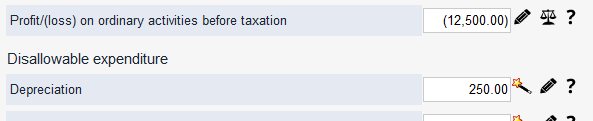
- Enter the figure for Profit/(loss) on ordinary activities before taxation – this is the total of trading profit/(loss) and property profit/(loss).
- Enter Disallowable expenditure (Depreciation).
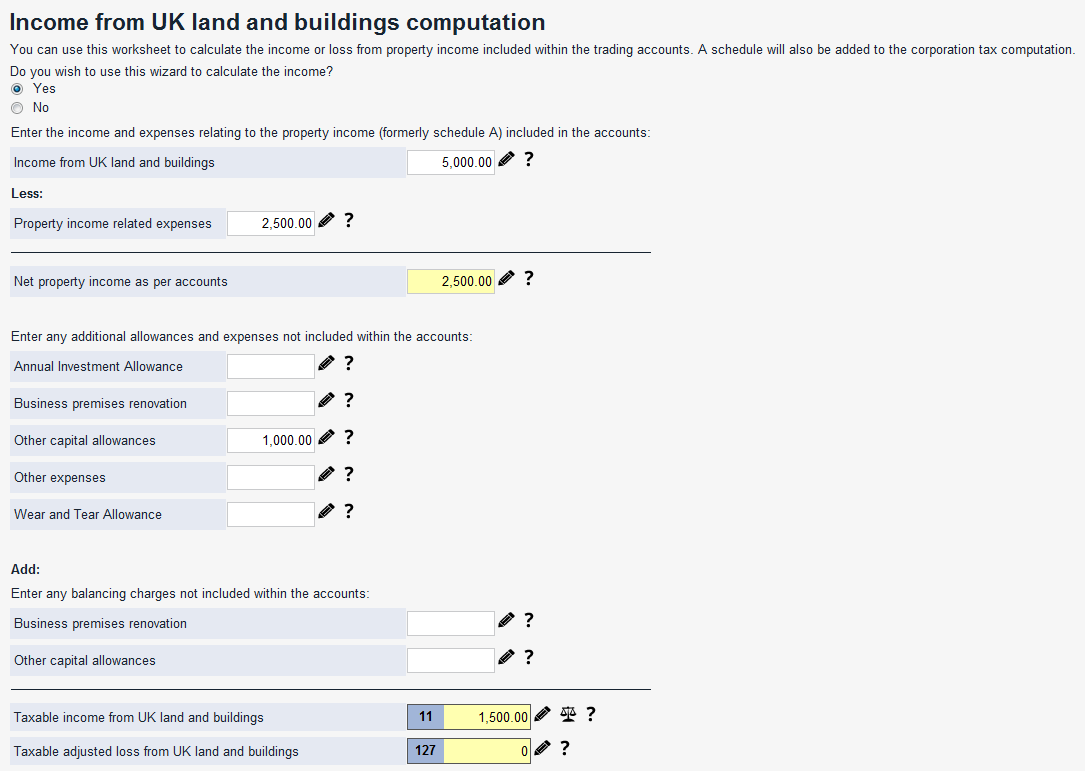
- Go to Tax adjusted profit/(loss) worksheet – other adjustments > Income from UK land and buildings.
- Enter Income from UK land and buildings – this is the rent received, before expenses.
- Enter Property income related expenses – this is the total expenses included in the profit/(loss) figure in Step 1.
- Enter Other capital allowances – this is any additional expenses not included in calculating the profit/(loss) figure.
Worked example
This example shows you how to complete a CT600 form using the following trading and property income figures:
- Trading loss = £15,000
- Disallowable expenditure (depreciation) = £250
- Taxable trading loss = £15,000 - £250 = £14,750
- Rent received = £5,000
- Rental expenses = £2,500
- Capital allowances/other expenses = £1,000
- Taxable property income = £2,500 - £1,000 = £1,500
Calculate and enter the following figures (see diagram):
- Profit/(loss) on ordinary activities before taxation = £(15,000) + £5,000 - £2,500 = £(12,500)
- Disallowable expenditure (Depreciation) = £250
Go to Tax adjusted profit/(loss) worksheet – other adjustments > Income from UK land and buildings and enter the following figures (see diagram):
- Income from UK land and buildings = £5,000
- Property income related expenses = £2,500
- Other capital allowances = £1,000
Note: If you enter Income from UK land and buildings net of expenses (that is, as £5,000 - £2,500 = £2,500), then you don’t need to enter Property income related expenses.


 Cookie Settings