Making sure a paper return is counted correctly as being filed in TaxCalc
Customers report that if they change the filing status (Set work status > Set Tax Work Status) this does not update the Tax File counters as being submitted, leaving the Tax Returns filed as being incorrect.
In order to make sure the Tax Returns filed counter reflects both the returns filed electronically and those filed by paper, users need to follow the steps below.
- Open the return for the client in question
- Click on Check and Finish
- Click on Print
- Click on Next Step (if applicable) to get past the HMRC warning page
- Ensure that the following options are selected
- What do you want to print? > This complete Tax Return
- Who is it for? > HMRC (official return pages to file by post)
- Click on Create Preview
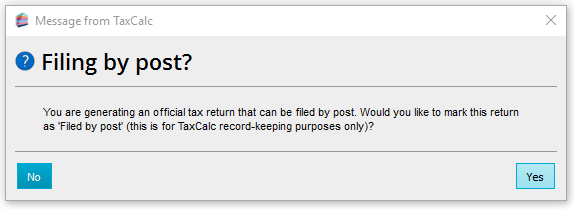
After the preview has generated you should receive the below pop up.
- Click on the yes button. This will update the Tax Work status counter, and change the status to Filed by paper.


 Cookie Settings